🔔 On Haptic Event
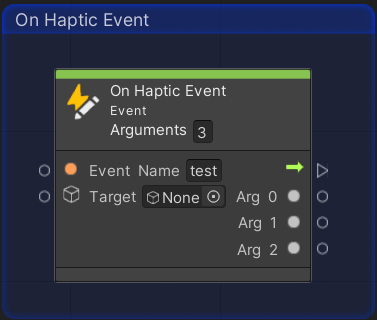
The On Haptic Event node serves as an entry point for your Visual Scripting graphs. It listens for specific haptic signals broadcast via the EventBus and executes the attached flow when a match is detected.
📥 Input Ports
| Port | Type | Description |
|---|---|---|
| Event Name | String | The unique identifier to listen for. |
| Target | GameObject | The source object to listen on. If null, listens globally. |
⚙️ Output Ports
| Port | Type | Description |
|---|---|---|
| Trigger | Control | The flow to execute when the haptic event is received. |
| Arguments | Dynamic | The data payloads received from the trigger node. |
💡 Best Practice
Use the Target input to scope your haptic feedback to specific game objects (e.g., a player character or a destructible environment piece). This prevents global event collision in complex scenes with multiple haptic sources.